> For the complete documentation index, see [llms.txt](https://docs.handle.fi/llms.txt). Markdown versions of documentation pages are available by appending `.md` to page URLs; this page is available as [Markdown](https://docs.handle.fi/chinese/how-to-guides/bridge.md).
# bridge
the handle multichain bridge, allows users to easily and rapidly move **FOREX** and **fxTokens** across ethereum, arbitrum and polygon with more chains on their way.
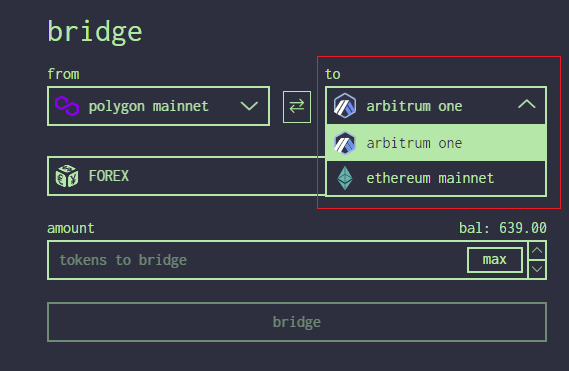
1. go to app.handle.fi/bridge
2. connect you wallet and ensure you are connected to the network you want to bridge **'from'**
3. select the **'to'** network from the dropdown - we are bridging from **polygon** to **arbitrum**
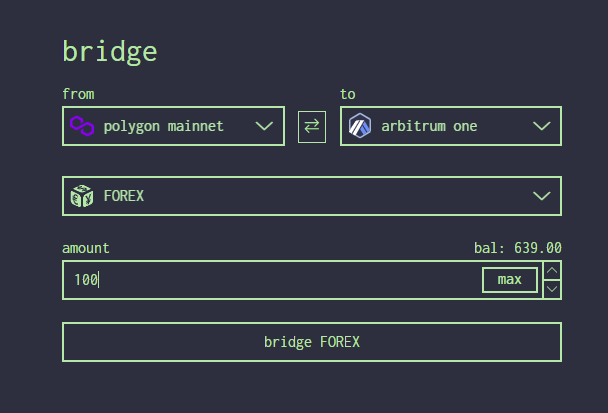
4. select the token you want to bridge and enter the amount - in this case we will bridge 100 $FOREX
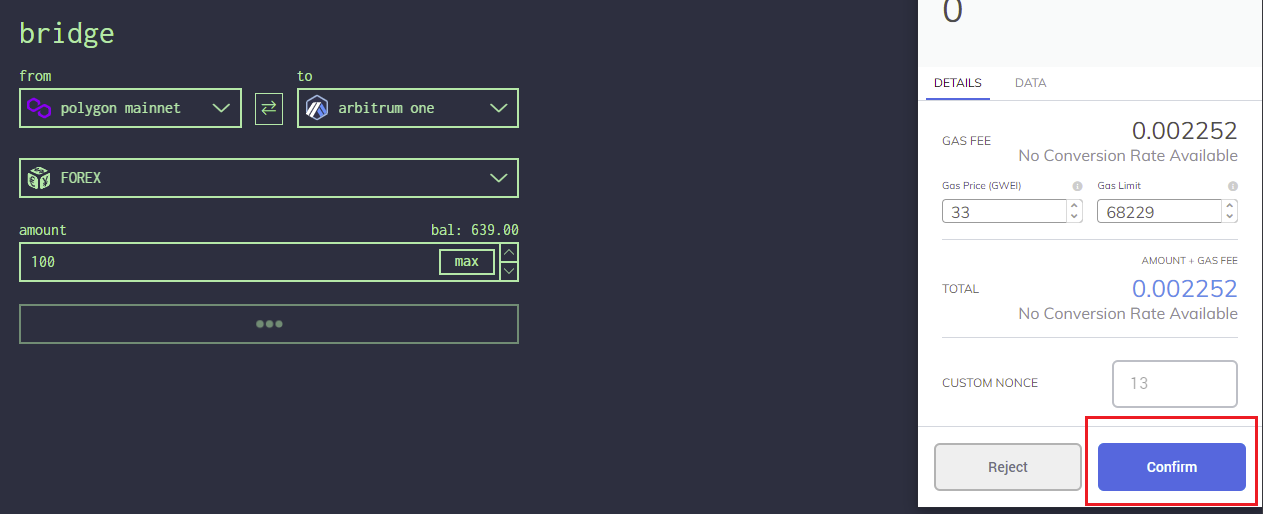
5. select **'bridge FOREX'** button and confirm the tx.
6. wait until the transaction is mined successfully - you will see a message appear **"tokens deposited to bridge'.**
7. a new button should appear showing the bridged tokens as a pending withdrawal on the **'to'** chain.
8. either switch to the **'to'** network OR select the button and it will force the network switch.
9. once on the **'to'** network - click on the withdraw button and you will be prompted to sign a transaction.
10. tokens will now be withdraw to the same address.
### external bridges
if you wish to bridge ETH (or other ERC20) native ecosystem bridges can be found at;
**Arbitrum**:
**Optimism**:
**Polygon**: