> For the complete documentation index, see [llms.txt](https://docs.handle.fi/llms.txt). Markdown versions of documentation pages are available by appending `.md` to page URLs; this page is available as [Markdown](https://docs.handle.fi/chinese/forex/zhi-li-zhi-ya-veforex/obtain-fxusd-forex-bpt-and-lock-for-veforex.md).

# obtain fxUSD/FOREX BPT & lock for veFOREX

### 步骤1. 获得Balancer fxUSD/FOREX (20/80) BPT

FOREX持有者将他们的FOREX + fxUSD存入Balancer fxUSD/FOREX (20/80)流动性池，为协议提供流动性，作为回报，他们将获得一个Balancer Pool Token (BPT)

\
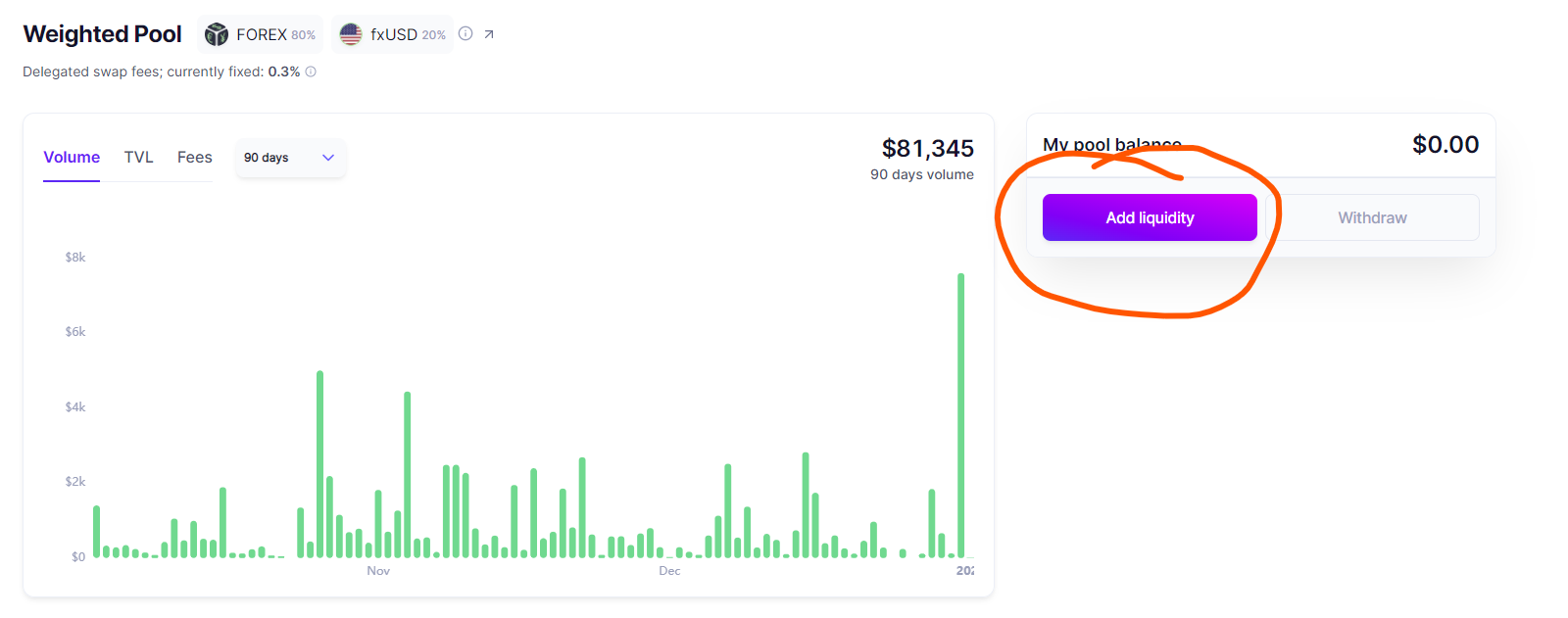
\&#xNAN;**(a)**. 前往这里的Balancer池页面并选择"添加流动性"

<figure><img src="/files/bKUBZ2M4HmN7X7PEWwXh" alt=""><figcaption></figcaption></figure>

**(b).** 输入您想添加的流动性的数量\
\
\&#xNAN;**(确保点击"按比例建议"以确保资产以正确的比例添加 - 以最小化任何价格影响)**
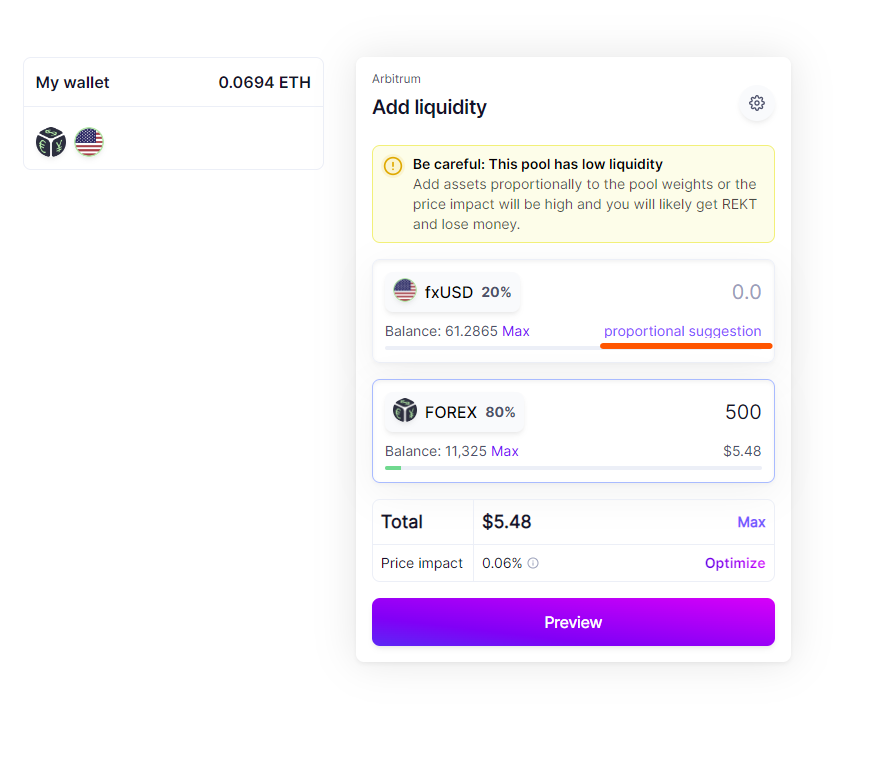
<figure><img src="/files/wJN3pCBVxVUYswCLTqbA" alt=""><figcaption></figcaption></figure>

### 步骤2. 将您的BPT锁定为veFOREX

**一旦成功地将流动性添加到Balancer池中...**\
\
\&#xNAN;**(a)** 前往<https://app.handle.fi/earn> 并将您的fxUSD/FOREX (20/80) BPT锁定您选择的时间（最少1周 - 最多1年

<figure><img src="/files/1h0FuRJ0Qzhc7WUtlTkf" alt=""><figcaption></figcaption></figure>

{% hint style="success" %}
就是这样！！ - 您现在持有veFOREX，并将能够：

* 获得协议费用分配（包括交易、兑换和借款）。
* 参与治理&#x20;
* 在以下方面获得高达2.5倍的增强奖励：
* hLP流动性&#x20;
* fxKeeper流动性&#x20;
* 交易和推荐返利
  {% endhint %}


---

# Agent Instructions
This documentation is published with GitBook. GitBook is the documentation platform designed so that both humans and AI agents can read, navigate, and reason over technical content effectively. Learn more at gitbook.com.

## Querying This Documentation
If you need additional information that is not directly available in this page, you can query the documentation dynamically by asking a question.

Perform an HTTP GET request on the current page URL with the `ask` query parameter, and the optional `goal` query parameter:

```
GET https://docs.handle.fi/chinese/forex/zhi-li-zhi-ya-veforex/obtain-fxusd-forex-bpt-and-lock-for-veforex.md?ask=<question>&goal=<endgoal>
```

`ask` is the immediate question: it should be specific, self-contained, and written in natural language.
`goal` is optional and describes the broader end goal you are ultimately trying to accomplish on behalf of the user. GitBook uses it to tailor the answer towards what is most useful for that goal.

The response will contain a direct answer to the question and relevant excerpts and sources from the documentation.

Use this mechanism when the answer is not explicitly present in the current page, you need clarification or additional context, or you want to retrieve related documentation sections.